Βήμα 1
Καθορίστε την κατηγορία της εφαρμογής
Start with category, audience, required text, platform constraints and the emotional signal the icon should send.
UlazAI - Εργαλεία εικόνας και βίντεο AI
Ροή εργασιών UlazAI βάσει χρήσης
Δημιουργήστε παρτίδες οδηγιών εικονιδίων εφαρμογών, φόντα στιγμιότυπων οθόνης και οπτικές έννοιες με λίστα αποθήκευσης πριν βελτιώσετε τα τελικά στοιχεία στη ροή εργασιών σχεδιασμού σας.
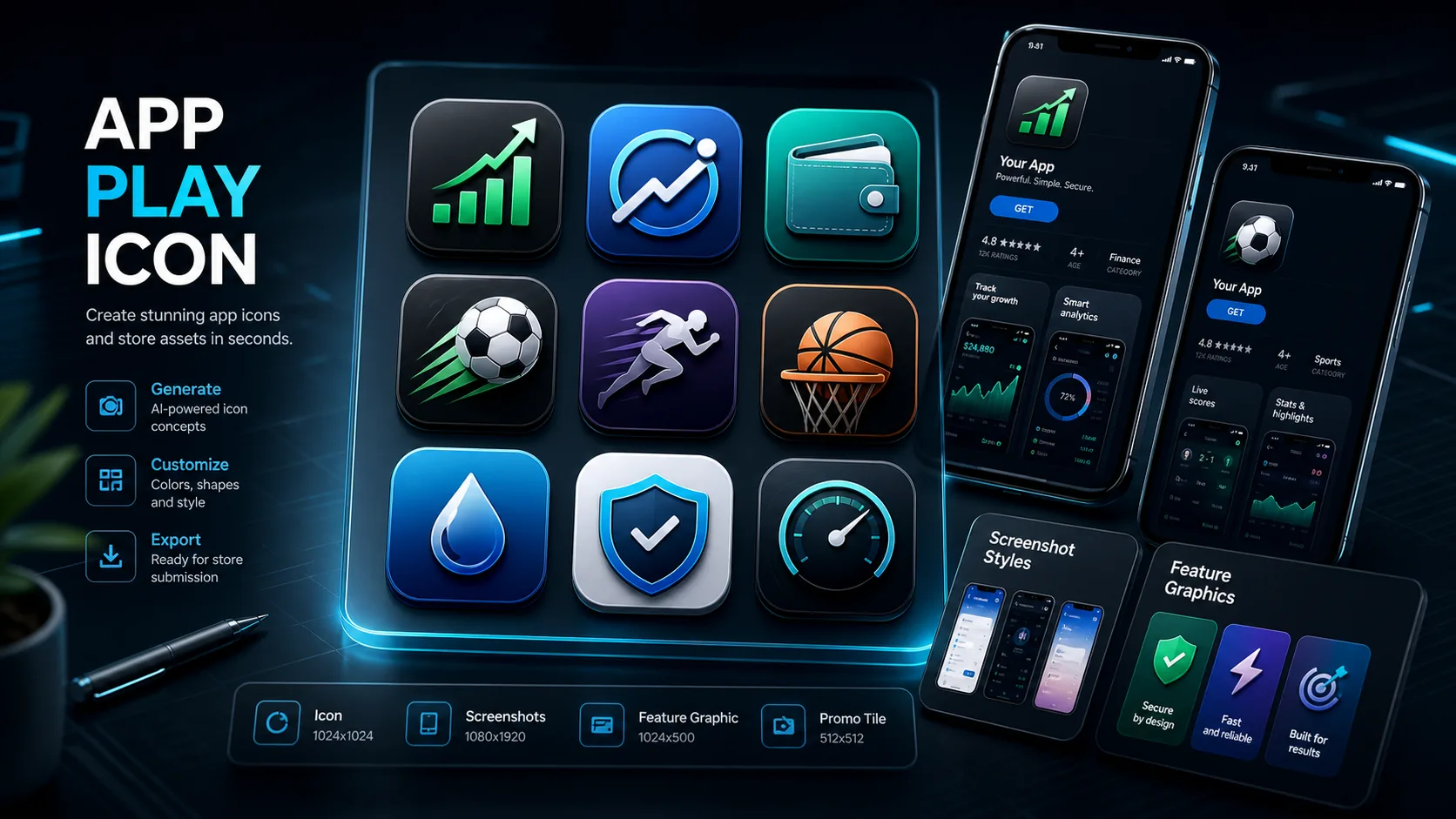
Παράδειγμα που δημιουργήθηκε
AI-generated app store creative directions
Ροή εργασιών περιουσιακών στοιχείων ASO
Start with category, audience, required text, platform constraints and the emotional signal the icon should send.
Create multiple icon and screenshot directions quickly, then pick the strongest visual language.
Export the strongest idea into your design tool for exact Google Play dimensions, padding and final compliance checks.
Αυτές δεν είναι γενικές εικασίες περιεχομένου. Αντιστοιχίζονται σε πραγματικές ροές εργασίας χρηστών που έχουν ήδη εμφανιστεί στη χρήση παραγωγής UlazAI.
Παραδείγματα εξόδων
Κάθε παράδειγμα συνδυάζει το ορατό αποτέλεσμα με ένα prompt που οι χρήστες μπορούν να αντιγράψουν, να προσαρμόσουν και να εκτελέσουν μέσα στο UlazAI.
Πραγματικό δημιουργημένο περιουσιακό στοιχείο ράστερ
Αυτό είναι το είδος της ολοκληρωμένης οπτικής που θα πρέπει να περιμένει ο επισκέπτης να δημιουργήσει, στη συνέχεια να κινήσει, να αναμιχθεί ή να χρησιμοποιήσει ως αναφορά παραγωγής.
Ανοίξτε το Image Studio3x3 icon directions
Εννέα διακριτές οδηγίες εικονιδίων για γρήγορη δοκιμή ASO πριν γυαλίσετε το καλύτερο σε ένα εργαλείο σχεδίασης.
Generate a 3x3 grid of Google Play app icon concepts for a finance utility app, high contrast, simple central symbol, short readable wordmark area, modern trustworthy fintech style.
Icon + screenshot mood
Μια ισχυρότερη οπτική κατεύθυνση για δημιουργικά κατηγορίας αθλητικών/στοιχημάτων χωρίς να ξεκινάτε από έναν κενό καμβά σχεδίασης.
Create Google Play app icon and screenshot background concepts for a sports odds app, energetic stadium color, bold central symbol, readable title space, modern ASO creative style.
Feature graphic concepts
Καθαρά, αξιόπιστα στοιχεία καταχώρισης καταστήματος με αρκετή διαφοροποίηση για έλεγχο από τον μάρκετινγκ και βελτίωση της συμμόρφωσης.
Create Google Play feature graphic concepts for a loan comparison app, clean fintech interface mood, trustworthy blue and green palette, abstract cards, no misleading claims, no fake rates.
Βιβλιοθήκη Prompt
Χρησιμοποιήστε τα ως γρήγορα σημεία εκκίνησης και, στη συνέχεια, αντικαταστήστε τους περιορισμούς θέματος, στυλ, γλώσσας κάμερας και εξόδου για το δικό σας έργο.
Δημιουργήστε μια ιδέα εικονιδίου εφαρμογής Google Play για μια εφαρμογή χρησιμότητας χρηματοδότησης, έντονη ευανάγνωστη κεντρική λέξη, υψηλή αντίθεση, χωρίς στρογγυλεμένες γωνίες, μοντέρνο στυλ ASO για κινητά.
Δημιουργήστε ένα πλέγμα 3x3 εννοιών εικονιδίων εφαρμογής για μια εφαρμογή αθλητικών αποδόσεων, κάθε έννοια διαφορετική, έντονη αντίθεση, απλό σύμβολο, μεγάλη ευανάγνωστη περιοχή τίτλου.
Δημιουργήστε έννοιες φόντου στιγμιότυπου οθόνης Google Play για μια εφαρμογή σύγκρισης δανείων, καθαρή παλέτα fintech, αξιόπιστη διάθεση διεπαφής, χωρίς παραπλανητικούς ισχυρισμούς.
Χρησιμοποιήστε το μοντέλο που ταιριάζει με τον τύπο εισόδου και το προφίλ κόστους. Δοκιμάστε πρώτα φθηνά και μετά ξοδέψτε στην πιο ισχυρή κατεύθυνση.
Best for prompt-following, text-heavy concepts and iterating on icon grids.
Useful for higher-resolution product and store listing visuals.
Good for fast alternative visual directions and concept exploration.
Συγκρίνετε ένα άλλο εργαλείο, ανοίξτε έναν οδηγό μοντέλου ή συνεχίστε με μια σχετική ροή εργασίας.
Use UlazAI for fast creative concepts, then finalize exact dimensions, padding and compliance in your design workflow.
Yes for concepting. Keep text short and large, then verify readability at small sizes before publishing.
Yes. Use separate prompts for icon concepts, screenshot backgrounds and feature graphic directions.
Ανοίξτε το σχετικό εργαλείο UlazAI, δημιουργήστε μια πρώτη έκδοση και μετά μετατρέψτε τα νικητήρια prompt σε επαναχρησιμοποιήσιμα στοιχεία.
Ανοίξτε το Image Studio